游戏优化设置 PGWARE GameSwift v2.3.7.2022
GameSwift 是一款能够让你提升游戏运行效率的软件,本质上其实还是系统优化工具。它可以快速的扫描你的计算机,找到系统中的问题,并且尝试去修复一些常见的问题,让你的系统能够更流畅。
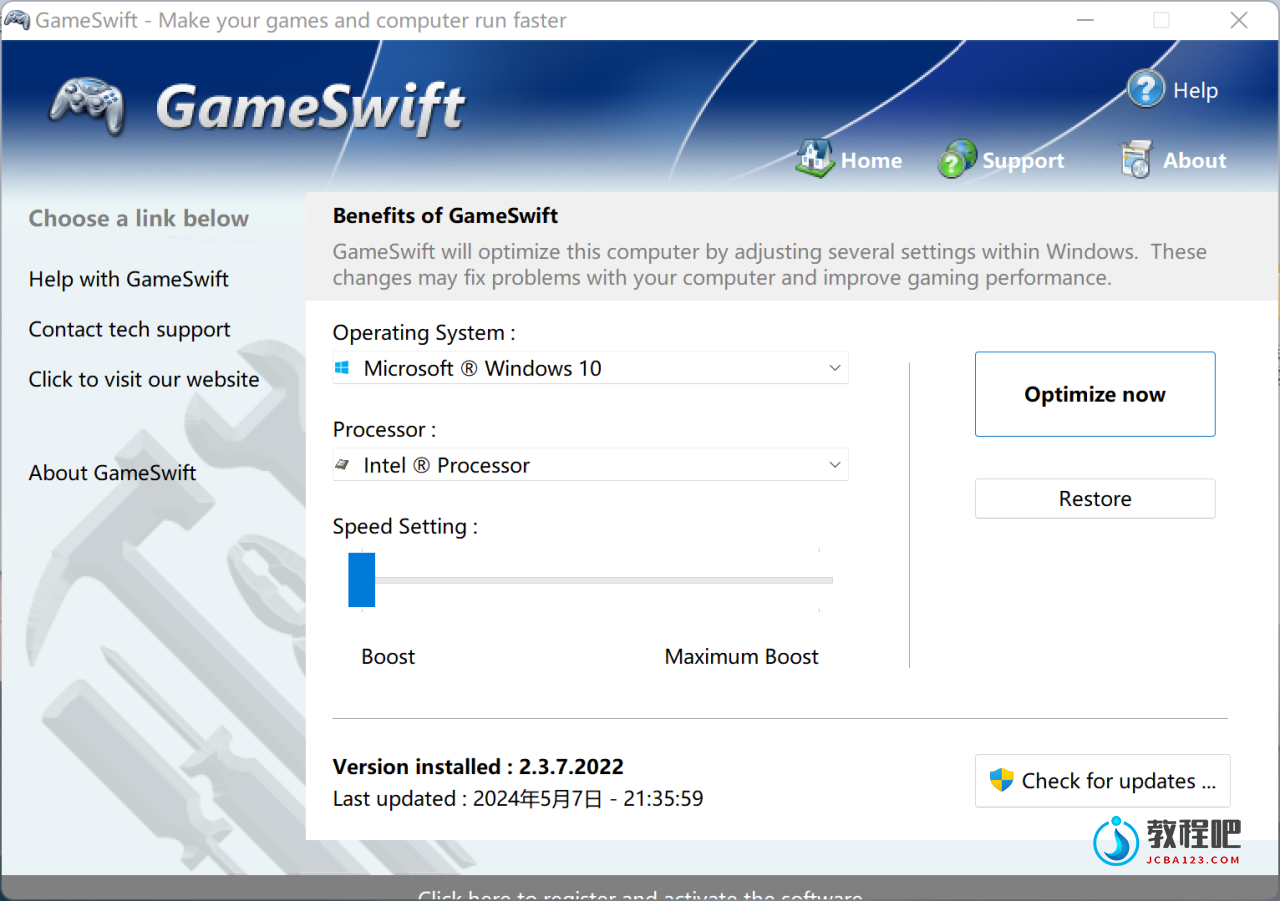
GameSwift sets the standard for PC and game optimization software. A combination of our two products PCMedik and GameGain; GameSwift instantly makes your computer faster and fixes common problems associated with frustrating slowdowns and errors and squeezes out every last bit of performance your computer and games are capable of. Do you remember when you first turned your brand new computer on and how fast it worked? With GameSwift and a click of the mouse you can bring back this speed to your computer instantly. GameSwift quickly scans your computer for common problems and fixes them, it then makes several permanent changes to Windows so your computer feels like it is brand new once again. Don’t deal with a slow computer and make tasks take longer to complete, install GameSwift and make your computer run faster.
Over time as you install new and updated software, you get the impression your computer is slower due to these applications being more demanding of faster hardware. GameSwift makes your computer faster by making several changes to Windows settings; for instance it turns off several animations that degrade performance, instructs the CPU how to prioritize background tasks, how files are loaded and written to the hard drive and changes to the way memory is used when programs use the memory swap file.
Heals Problems
Many small problems on your computer lead to a combined loss of performance over time, PCSwift will scan your computer for these problems and instantly repair them.
CPU Prioritization
GameSwift instructs the CPU to prioritize full screen applications so they are given the most power and access to more CPU cores; this allows games to work faster.
Constant Updates
We constantly update PCSwift with new system performance tweaks; this allows your computer to keep up with the latest software that demand faster hardware.
Faster Gaming Graphics
Increase the frames per second you are getting when playing the most current and exciting games without having to purchase a new graphics card, memory, or CPU.
GameSwift makes several Windows registry and system changes to increase the performance of your current gaming hardware; this allows you to play the most recent games without having to spend hundreds of dollars to upgrade your hardware. These changes made to your computer improve memory usage, how foreground applications are prioritized with the CPU, hard drive access read and write speeds, how fast graphics can display on your screen. GameSwift does not make changes, no patches and no modifications to games themselves, thus no anti-cheat detection software considers our software cheating software and you will not be banned from those gaming networks.
Optimizing your Windows environment to work faster with games is a no brainer if you are a hardcore PC video game enthusiast. Just like tuning a car to get higher performance, GameSwift tunes your PC’s hardware to work faster which improves gaming and your computer performance. Get every last bit of horsepower out of your computer to play your games smoother and faster while also fixing problems with your computer with a few clicks of the mouse. Download a trial version of GameSwift today and unleash the full power of your computer hardware for faster gaming.
GameSwift 2 Screenshots & Features
- Compatible with Microsoft Windows 10, 8, 7, Vista, XP & Windows Server 2012, 2008, 2003. 32-BIT/64-BIT ready.
- Optimizes your computer hardware to allow the latest games to run faster with the highest graphic settings possible.
- Increase the frames per second that is displayed allowing games to play much smoother and increase your enjoyment of these games.
- Decreases the amount of time for Windows to load, and makes loading and running your favorite programs much faster.
- GameSwift repairs common problems found on most computers and instantly fixes them to improve computer stability and performance.
- Changes are made to the Windows system permanently, allowing you to perform a single one time tune-up to increase performance forever.
- New and improved modern user interface, easy and intuitive to use and compliant with Windows user interface guidelines.
- Software updates can be downloaded and installed directly from inside the application without having to visit our web site.
Latest Update: 2.6.4.2018 – Fixed bug where application would not start for some version of the Windows 10 April Update.
Home Page: http://www.pgware.com
下载地址
游戏优化设置 PGWARE GameSwift v2.3.7.2022
https://www.123pan.com/s/PjcA-9eDRA.html
http://ctfile.luochenzhimu.com/d/13552432-61158235-d9ac31
https://pan.baidu.com/s/1L1HC0xG1p0jlcGfS3Af-pg?pwd=cgv0
https://pan.xunlei.com/s/VNxIKsGQt__aEOOdHCLduWGKA1?pwd=pxe6#
官方下载:http://www.pgware.com/downloads/gameswift.exe
安装指引:
运行Disable_PGWARE_hosts.cmd,输入1后按Enter确认,可以屏蔽激活码验证
打开注册机,切换到Game Swift 2,复制User Name和Registration Code到软件注册